Video wall
glint · Examples · Tutorials · Gallery
glint's four moving pictures (made by glint, looping: uniform sampler2D stage; greenScreen; oldFilm; logoLoop) on a wall of screens. The green-screen dancer is keyed out over the stage show, the classic thing to do with a green screen. Swap a name for webcam footage in texture0 to key yourself.
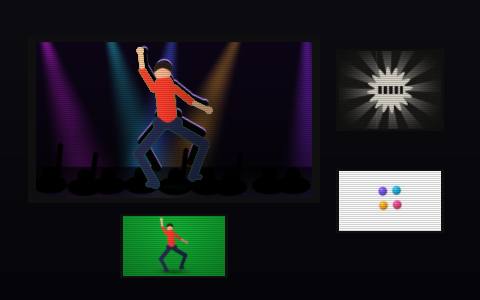
An example in glint, a free live shader editor in the browser: the GLSL code floats over the running picture and recompiles as you type.
The code
One pass, in GLSL.
fragment shader
#version 300 es
precision highp float;

uniform float time;
uniform vec2 resolution;
uniform sampler2D stage;
uniform sampler2D greenScreen;
uniform sampler2D oldFilm;
uniform sampler2D logoLoop;

in vec2 v_texcoord;
out vec4 fragColor;

// How green a pixel is, past what its red and blue explain: 0 = keep, 1 = the backdrop.
float key(vec3 c) {
    float g = c.g - max(c.r, c.b);
    return smoothstep(0.12, 0.3, g);
}

// One screen: the picture inside a bezel, a little glow round it.
vec3 screen(vec2 p, vec2 centre, vec2 size, int which, inout float hit) {
    vec2 q = (p - centre) / size;
    vec2 uv = q * 0.5 + 0.5;
    vec2 d = abs(q) - 1.0;
    float inside = step(max(d.x, d.y), 0.0);
    float bezel = step(max(d.x, d.y), 0.06) - inside;
    vec3 c = vec3(0.0);
    if (inside > 0.5) {
        hit = 1.0;
        if (which == 0) {
            // The stage show with the green-screen dancer keyed over it.
            vec3 bg = texture(stage, uv).rgb;
            vec3 fg = texture(greenScreen, uv).rgb;
            float k = key(fg);
            fg.g = min(fg.g, max(fg.r, fg.b) * 1.05); // take the green spill off the edges
            c = mix(fg, bg, k);
        } else if (which == 1) c = texture(oldFilm, uv).rgb;
        else if (which == 2) c = texture(logoLoop, uv).rgb;
        else c = texture(greenScreen, uv).rgb;
        c *= 0.92 + 0.08 * sin(gl_FragCoord.y * 3.14159);
    }
    if (bezel > 0.5) { hit = 1.0; c = vec3(0.06); }
    return c;
}

void main() {
    vec2 p = (gl_FragCoord.xy - 0.5 * resolution) / resolution.y;
    vec3 col = vec3(0.03, 0.03, 0.05) + 0.03 * p.y;
    float hit = 0.0;
    vec3 c;
    c = screen(p, vec2(-0.22, 0.1), vec2(0.46, 0.26), 0, hit); if (hit > 0.5) { col = c; hit = 0.0; }
    c = screen(p, vec2(0.5, 0.2), vec2(0.17, 0.13), 1, hit); if (hit > 0.5) { col = c; hit = 0.0; }
    c = screen(p, vec2(0.5, -0.17), vec2(0.17, 0.1), 2, hit); if (hit > 0.5) { col = c; hit = 0.0; }
    // And the green screen as it comes, before keying.
    c = screen(p, vec2(-0.22, -0.32), vec2(0.17, 0.1), 3, hit); if (hit > 0.5) { col = c; hit = 0.0; }
    fragColor = vec4(col, 1.0);
}
More Games, sound & cube maps examples
Little synth · Cube map reflections · Textured room · Stand inside (VR) · HDRI reflections